
Turn "it sometimes makes things up" into a number you can track. How DeepEval's hallucination and faithfulness metrics work, and how to report a hallucination rate that leaders can trust.
"How often does our agent make things up?" It's the question executives ask most about AI agents, and the one teams are least able to answer. "Rarely" isn't evidence. A rate with a definition, a denominator, and a breakdown by workflow is.
Here, we show how to measure hallucinations with DeepEval, the open-source Python evaluation framework, using its hallucination and faithfulness metrics, and how to turn the scores into a report leaders can act on.
Two metrics, two different questions
DeepEval has two metrics that are often confused. They answer different questions and need different inputs.
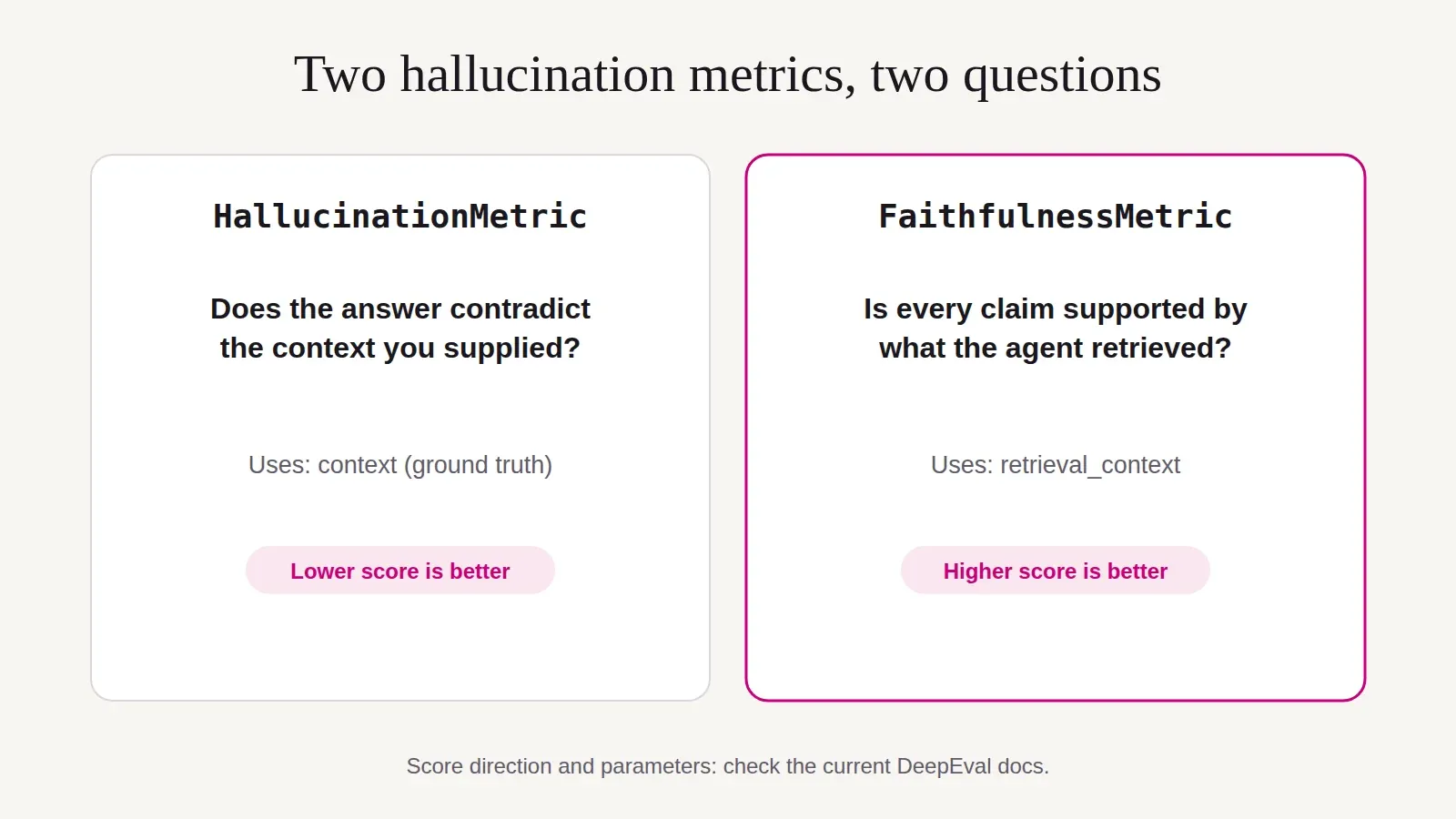
HallucinationMetric asks: does the answer contradict the ground-truth context you supplied?* You provide the facts (`context`), for example, the actual refund policy, and the metric checks the agent's answer against them. The score reflects the share of contexts the answer contradicts, so **lower is better**.FaithfulnessMetric asks: is every claim in the answer supported by what the agent retrieved? It reads the agent's own `retrieval_context`, breaks the answer into claims and checks each one. Higher is better.
Use faithfulness when you want to know whether a retrieval-based agent stays true to its sources. Use the hallucination metric when you have authoritative facts to check against, regardless of what the agent retrieved. Many teams use both.
Think in claims, not answers
The most dangerous hallucinations hide inside mostly-correct answers: a refund window stated correctly but with the receipt requirement dropped, or an accurate summary with one invented exception.
That's why claim-level checking matters. Faithfulness-style metrics break an answer into individual statements and check each one, so a single unsupported claim lowers the score. For policy-critical workflows, set thresholds high enough that one invented detail fails the answer.
Walkthrough: measuring hallucinations
1. Build a test set with answerable and unanswerable questions
Pair each question with the facts that should answer it. Then add questions your sources **can't** answer. Those are where agents are most likely to invent something, and where the right answer is "I don't know" or a handoff.
from deepeval.test_case import LLMTestCase
POLICY = [
"Refunds are available within 30 days of purchase with a receipt.",
"Opened software cannot be refunded.",
]
cases = [
LLMTestCase(
input="Can I get a refund on headphones I bought last week?",
actual_output=run_agent("Can I get a refund on headphones I bought last week?"),
context=POLICY,
),
# ...more answerable cases
]
2. Score each case
from deepeval.metrics import HallucinationMetric
metric = HallucinationMetric(threshold=0.2)
metric.measure(cases[0])
print(metric.score) # share of contexts contradicted (lower is better)
print(metric.reason) # the judge's explanation
For a retrieval-based agent, check faithfulness to what it retrieved:
from deepeval.metrics import FaithfulnessMetric
case = LLMTestCase(
input=question,
actual_output=answer,
retrieval_context=retrieved_chunks, # what your agent actually used
)
faithfulness = FaithfulnessMetric(threshold=0.9)
faithfulness.measure(case)
3. Turn scores into a rate
Scores per answer are useful for debugging. Leaders need a rate.
failed = 0
for case in cases:
metric = FaithfulnessMetric(threshold=0.9)
metric.measure(case)
if not metric.is_successful():
failed += 1
print(f"{failed} of {len(cases)} answers contained unsupported claims")
4. Score the unanswerable set separately
For questions with no answer in your sources, neither metric tells you whether the agent appropriately declined. Use a custom criterion such as "The answer declines, asks a clarifying question or hands off, rather than giving specific information not in the context." The G-Eval post in this series shows how to build it.
Reporting a hallucination rate
A useful report has four things: a written rule for what counts, the numerator and denominator, a breakdown by workflow and the unanswerable set reported separately.
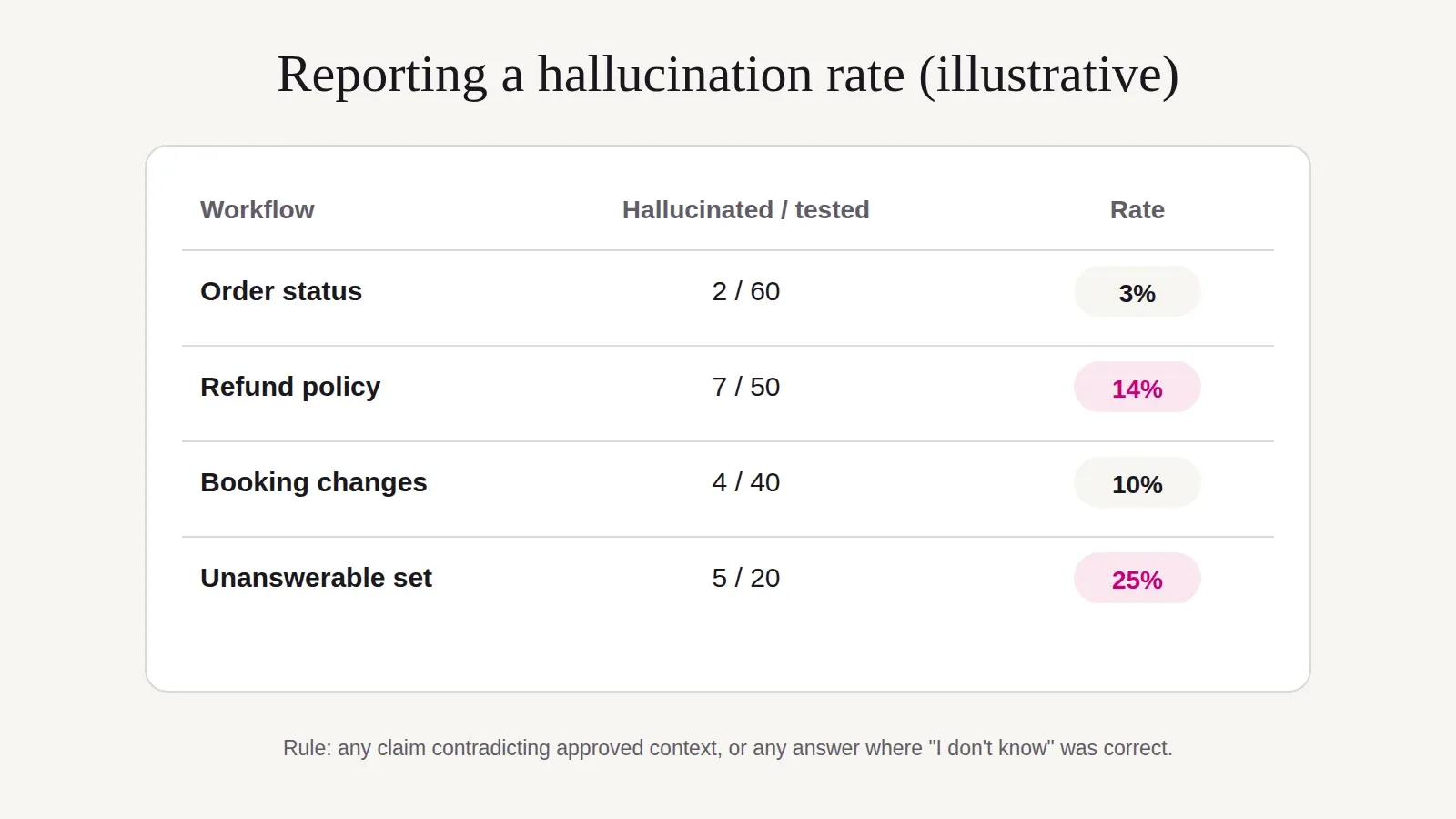
In this illustrative report, the overall picture hides the story: refund answers and unanswerable questions drive most of the problem. That points straight to the fix: better policy content and clearer instructions for when to say "I don't know".
What these metrics can't see
Be clear about the limits before you report numbers upward:
- Claimed actions. If the agent says "your refund has been issued", faithfulness can't check whether it was. You need tool and state checks; see the agentic metrics post in this series.
- Missing context. If your ground truth is incomplete, a correct answer can look like a hallucination, and vice versa. Review a sample of results with a domain expert.
- Judge errors. Both metrics use a judge model. Compare its verdicts with expert labels on 30–50 cases before you trust the rate.
- Exact values. For prices, IDs and dates, a code check against your system of record is cheaper and more reliable than any LLM judge.
Choosing the right judge
1.Code checks for exact facts: amounts, dates, order numbers.
2.DeepEval's faithfulness and hallucination metrics (LLM-as-a-judge) for paraphrased claims.
3.State checks or agent judges for claimed actions.
4.Human experts for disputed cases and to calibrate thresholds.
What this means for your role
VPs and executives. Ask for hallucination rates by workflow, with the rule and sample size stated. Set acceptable rates per workflow based on the cost of an error; "zero" isn't a credible target.
Directors. Track the rate across releases. A rising rate after a model or content change is an early warning.
Managers. Invest in ground-truth content and the unanswerable set first. They drive the quality of everything else.
HR and talent leaders. Policy owners and domain experts are essential reviewers. Give them defined time to label and adjudicate cases.